Twitch Category
& Title switcher
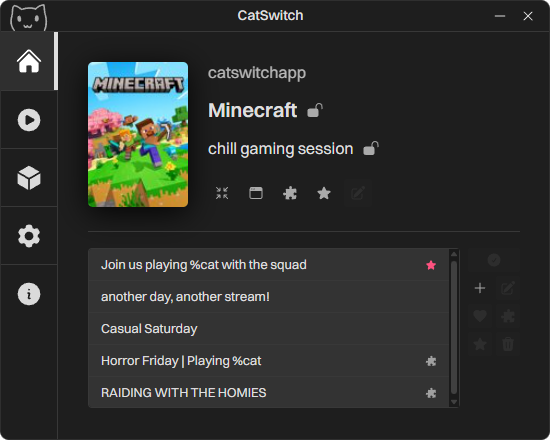
No more manual
category switching
for every game
Your Twitch category updates the moment you switch games or apps, so you never have to change it manually again.
Exclude specific apps, adjust stream titles, and set up category presets to match exactly how you stream. Everything runs quietly in the background, keeping your channel accurate without breaking your flow.


Style it however you want
Just add your own CSS file and customize everything from colors and fonts to spacing and layout. If you can style it with CSS, you can change it.
Whether you want to create a completely different look or simply fine-tune a few details, CatSwitch makes it easy to shape the app to match your preferences.
If you create a theme you're proud of, you can also share it with the community and let others use it.
Frequently Asked Questions
Yes, it's an open-source project I just made for fun to solve an issue that bothered me.
There are absolutely no hidden payments, paid features, or any other form of monetization—not even ads.
As of right now, I'm not earning any money from this project.
Yes. When you log in, CatSwitch saves your Twitch token to your local app folder — not as readable text.
Tokens are encrypted with Windows DPAPI, which ties it to your Windows user account on this PC, so if you copy it elsewhere or someone else opens it, it won't decrypt. Only CatSwitch running as you, on this machine, can unlock it and use the token to talk to Twitch's API.
CatSwitch checks if your currently focused window is a game by looking at the app's name, where it's installed, and its window title — then matches that against Twitch categories. Once a game's been detected successfully, it's saved to your catalog, so it doesn't need to be looked up again. From there, detection's instant.
In rare cases, if detection fails or picks the wrong category, you can just edit the game and fix it yourself.
You can also exclude apps from being detected as games entirely — add them to your Excluded Apps list, for example browsers, launchers, or anything else you don't want treated as a game. Excluded apps get skipped completely, so CatSwitch won't switch your category when you focus them.
CatSwitch ships with a common-apps list that excludes a lot of standard programs by default.
No. All data stays local and never leaves your computer — there's no server collecting anything.
Most people streaming use Windows, so that's where I focused first.
Never say never, but supporting other operating systems isn't planned right now, and it's unlikely to happen in the near future.
Feel free to open an issue on the project's GitHub so I can look into it. Please include as much detail as possible — what happened, the exact steps to reproduce it, and anything else that might help me track it down.
Some of the text has been proofread and corrected by AI,
since English isn't my native language.